



Operating Instructions
On
With the light locked and the tactical switch fully pressed, turn the toggle switch from Lockout mode to any mode to turn on the flashlight.
With the light unlocked and turned off, tap the tactical switch to turn on the light momentarily or fully press the tactical switch to turn on the light constantly.
Off
With the light unlocked and turned on, fully press the tactical switch or turn the toggle switch to Lockout mode to turn off the flashlight.
Mode Switching
With the light head facing upward, turn the toggle switch to switch between three modes (from left to right) : Duty mode→Lockout mode→Tactical mode.
Output Selection
Duty mode: With the light turned on, single click the functional switch to cycle through Eco→Low→Med→High.
Tactical mode: With the light turned on, single click the functional switch to select between Eco and Turbo.
Instant Turbo
With the light turned on, press and hold the functional switch for 0.5 seconds to enter Instant Turbo and lock it. Single click the functional switch to return to the previously used output.
With the light turned off, press the functional switch to enter Turbo. Release the functional switch and the light will go off.
*This operation is only applicable in Duty mode.
Instant Strobe
With the light turned on, press and hold the functional switch for 0.5 seconds to enter Instant Strobe. Single click the functional switch to exit Strobe and return to the previously used output.
With the light turned off, press the functional switch to enter Instant Strobe. Release the functional switch and the light will go off.
*This operation is only applicable in Tactical mode.
Intelligent Memory Circuit
The flashlight automatically memorizes the previously used output. When turned on again, the previously used output will be recalled.
Battery Specifications
Type | Dimensions | Nominal Voltage | Usability | |
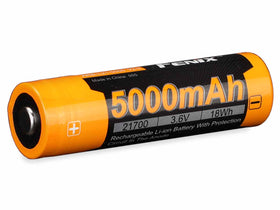
Fenix ARB-L21-5500 | 21700 | 3.6 V | Recommended | √√ |
Fenix ARB-L21-5500U | 21700 | 3.6 V | Recommended | √√ |
Fenix ARB-L21-5000 V2.0 | 21700 | 3.6 V | Recommended | √√ |
Fenix ARB-L21 Series | 21700 | 3.6 V | Recommended | √√ |
*Do NOT use an 18650 or 16340 battery.
*Do NOT mix batteries of different ages, capacities, or types.
*21700 Li-ion batteries are powerful cells designed for commercial applications and must be treated with caution and handled with care. Using low-quality batteries or mishandling batteries (such as short-circuiting or overheating) could lead to combustion and jeopardize the safety of users and property. Any adverse effects resulting from the use of low-quality batteries are not covered by any Fenix warranty or liability. Using quality batteries with circuit protection will reduce the potential for combustion or explosion.
Battery Replacement
Unscrew the light head and insert the battery with the anode side (+) towards the light head, then screw the light head back on.
Charging
Turn off the flashlight and open the flip cover to reveal the USB Type-C charging port.
Connect the USB Type-C end of the charging cable to the flashlight.
The charging indicator below the flip cover will display red while charging and will turn green when fully charged.
Once charging is completed, be sure to unplug the charging cable and close the flip cover.
Note:
- When charging fails or the battery is inserted in reverse, the charging indicator will flash red or remain off to remind users to check the battery.
- Recharge a stored flashlight every four months to maintain the optimum performance of the battery.
- Power specifications:
- 3.1 Charging voltage: 5 V/9 V
- Maximum charging power: 26 W (9 V/2.9 A)
- This flashlight supports fast charging. The charging time is approximately 1.5 hours from depleted to fully charged with a 9 V/2.9 A charging adapter.
- Only use a certified USB charging adapter that complies with local safety standards.
The flashlight cannot be operated while charging.
*These features only work with a Fenix ARB-L21 series battery.
Battery Level Indication
With the light turned off, single click the functional switch to check the battery level and the tail battery level indicator will last for 3 seconds.
- Green light on: saturated 100% - 85%
- Green light flashes: sufficient 85% - 50%
- Red light on: poor 50% - 25%
- Red light flashes (fast): critical 25% - 1%
*If the light is locked and the tactical switch is fully pressed, the tail battery level indicator will light up and show the current battery level until the tactical switch is disengaged.
*This feature only works with a Fenix ARB-L21 series battery.
Intelligent Overheat Protection
The flashlight will accumulate a lot of heat when used at high output levels for extended periods. When the flashlight reaches a temperature of 60°C/140°F or above, it will automatically step down a few lumens to reduce the temperature. When the temperature drops below 60°C/140°F, the flashlight will gradually recall the preset output level.
Low-voltage Warning
When the voltage level drops below the preset level, the flashlight is programmed to downshift to a lower brightness level until Low output is reached. When this happens in Low output, the flashlight blinks 3 times every 5 minutes to remind users to recharge or replace the battery in a timely manner. To ensure normal use, the flashlight will not turn off automatically and will work till the battery runs out or the battery protection is triggered.
*This feature only works with a Fenix ARB-L21 series battery.
Usage and Maintenance
- Disassembling the sealed head can cause damage to the flashlight and will void the warranty.
- Fully charge the flashlight in time to ensure normal function the next time it is needed.
- Fenix recommends using an excellent quality battery.
- If the flashlight will not be used for an extended period, remove the battery, or the flashlight could be damaged by electrolyte leakage.
- Lock the flashlight or remove the battery to prevent accidental activation during storage or transportation.
- Long-term use can result in O-ring wear. To maintain a proper water seal, replace the O-ring with an approved spare.
- Periodic cleaning of the battery contacts improves the flashlight's performance as dirty contacts may cause the flashlight to flicker, shine intermittently or even fail to illuminate for the following reasons:
A: Low battery level.
Solution: Replace or recharge the battery.
B: The contact or contact point of the battery or flashlight is dirty.
Solution: Clean the contact points with a cotton swab soaked in rubbing alcohol.
If the above methods don't work, please contact your authorized distributor.
Warning
- Do NOT look directly at the light source, stare at the light spot or shine the flashlight directly into the eyes of anyone!
- Do NOT place this flashlight in the reach of children!
- Do NOT place the light head near flammable objects, high temperatures can cause objects to overheat and become flammable/ignite!
- Do NOT use this flashlight in inappropriate ways such as holding the unit in your mouth, doing so could cause serious personal injury or death if the flashlight or internal battery fails!
- This flashlight will accumulate a significant amount of heat while operating, resulting in a high temperature of the light shell. Pay close attention to prevent burns!
- Turn off and lock the flashlight or remove the battery to prevent accidental activation when the flashlight is placed in a closed and flammable environment such as pockets and backpacks!
- The LEDs of this flashlight are not replaceable; so the whole flashlight will need to be replaced when any one of the LEDs reaches the end of its lifespan.